FREE & OPEN SOURCE

Velocitty

GPU-accelerated terminal emulator for Windows

Built with DirectX 11 and the native ConPTY backend. Silky-smooth rendering, instant file search, tabs, panes, and Sixel graphics - everything a modern terminal should be.

DirectX 11 GPU Rendering
60fps Smooth Output
ConPTY Native Backend
Sixel Graphics Protocol

Built for developers

GPU Rendering
DirectX 11

Hardware-accelerated rendering pipeline with glyph atlas caching. Zero-latency input response and VSync support.

DirectWrite
Text Shaping

High-quality subpixel font rendering with full OpenType ligature support for your favorite coding fonts.

Full VT100
ANSI Support

Complete CSI, OSC, and DCS escape sequence processing. Works with everything from vim to htop.

Tabs & Panes
Window Management

Multiple tabs, horizontal/vertical splits with recursive nesting. Custom Windows 11-style titlebar.

Sixel Graphics
Image Protocol

Display images directly in your terminal. Full DEC Sixel protocol with GPU-optimized rendering.

File Search
MFT Indexed

Find any file instantly. Background disk indexing with trigram matching for fuzzy search results.

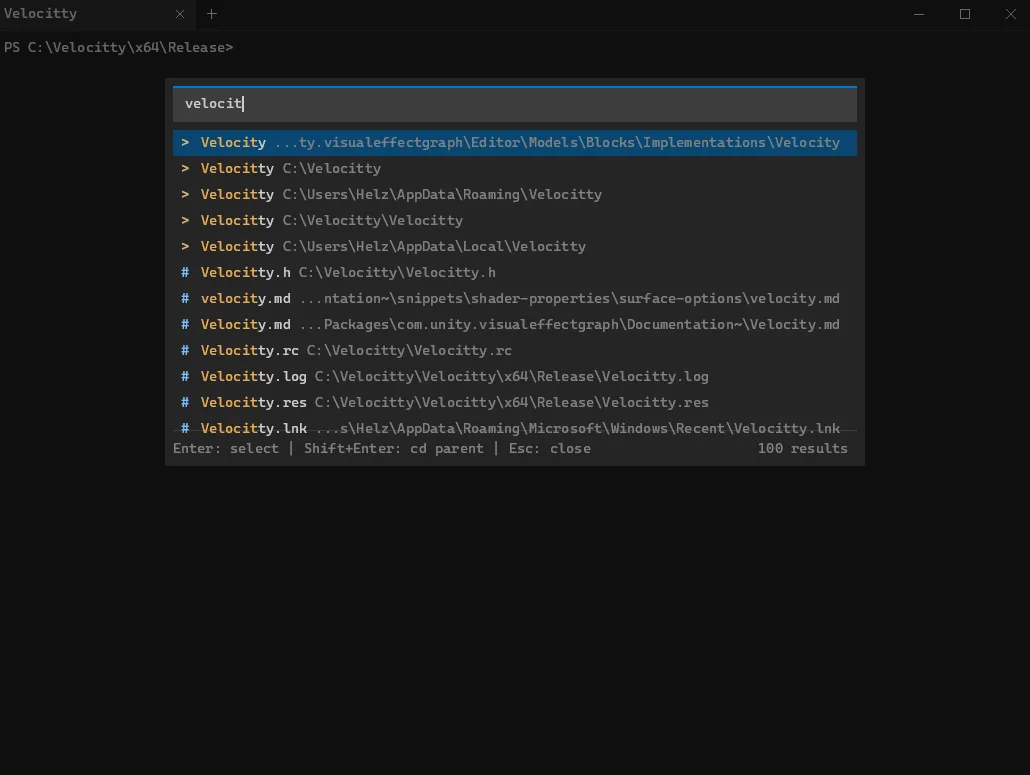
INSTANT FILE SEARCH

Find anything in milliseconds

Velocitty indexes your drives in the background using Windows MFT enumeration. The trigram-based search engine delivers results as you type - no waiting, no lag, just instant access to any file on your system.

Fast Master File Table scanning
Fuzzy matching with trigram index
Real-time results as you type
Quick actions: cd, open, or copy path
Velocitty File Search
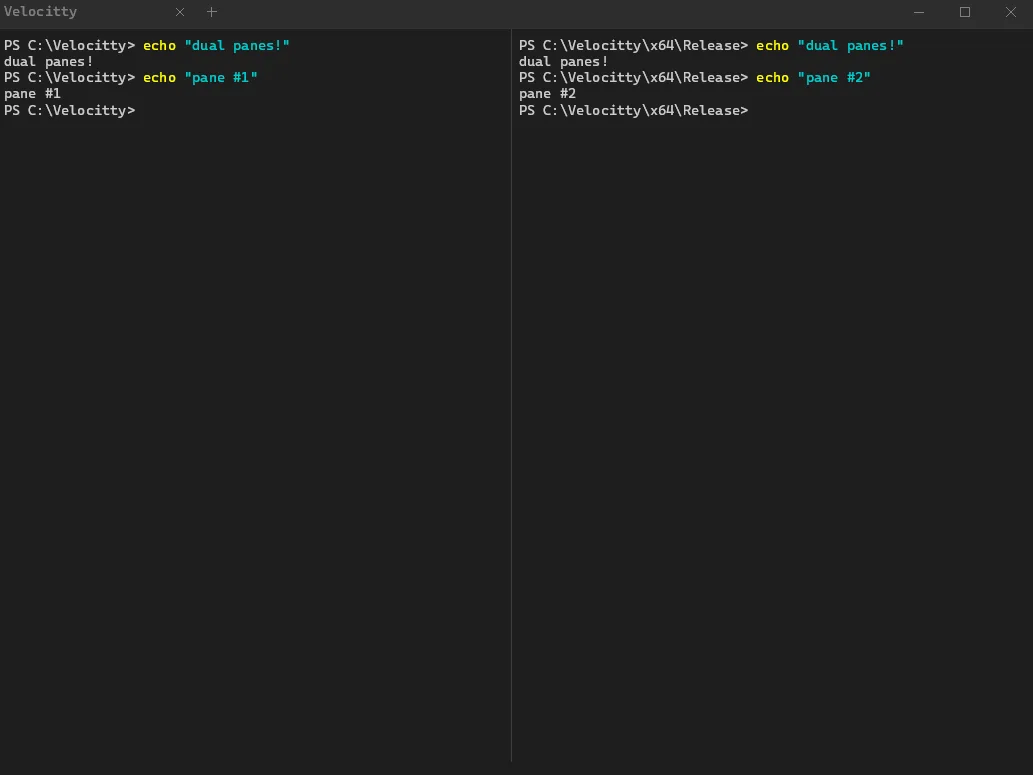
PANE SPLITTING

Organize your workspace

Split your terminal horizontally, vertically, or both. Each pane runs its own independent shell session. Nest splits recursively to create the exact layout you need.

Horizontal and vertical splits
Recursive nesting support
Independent shell sessions
Keyboard-driven navigation
Velocitty Pane Splitting

Navigate with speed

Ctrl + T
New Tab
Ctrl + W
Close Tab
Ctrl + Tab
Next Tab
Ctrl + Shift + D
Split Vertical
Ctrl + Alt + D
Split Horizontal
Ctrl + Shift + F
File Search
F11
Fullscreen
Ctrl + +
Zoom In
CUSTOMIZATION

Make it yours

Every aspect of Velocitty is configurable through a simple JSON file. Colors, fonts, keybindings, scrollback - dial in your perfect setup.

Full 256-color and true color
Custom fonts with ligatures
Configurable keybindings
Cursor styles and blink rate
config.json
{
  "colors": {
    "background": "#0a0a0f",
    "foreground": "#e8e9ed",
    "cursor": "#00ff88"
  },
  "font": {
    "family": "Cascadia Code",
    "size": 14,
    "ligatures": true
  },
  "terminal": {
    "scrollbackLines": 10000,
    "cursorBlink": true
  },
  "rendering": {
    "vsync": true
  }
}

What you need

Windows 10 1809+

ConPTY support required for the native pseudo-terminal backend

DirectX 11 GPU

Any modern graphics card with DirectX 11 support

VC++ Runtime 2022

Visual C++ Redistributable for Visual Studio 2022

$ velocitty --install

Ready to upgrade your terminal?

Free and open source. Download now and experience the difference.